GNOME Shell Extension

Stay hydrated,
effortlessly.

Water Reminder lives quietly in your Top Bar and nudges you to drink water on a schedule that fits your day — with sound, smart hours, and zero clutter.

↓  Install Now View on GitHub ☕ Buy me a coffee
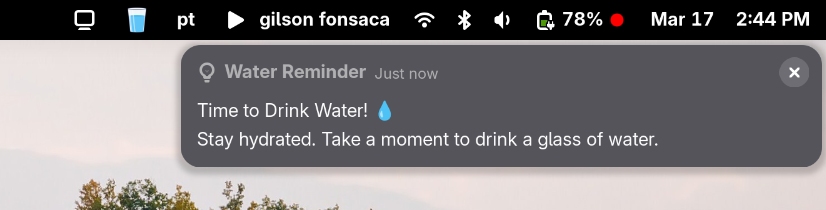
Reminder
Water Reminder

The alerts appear in the native Gnome notification area.

Preferences Window
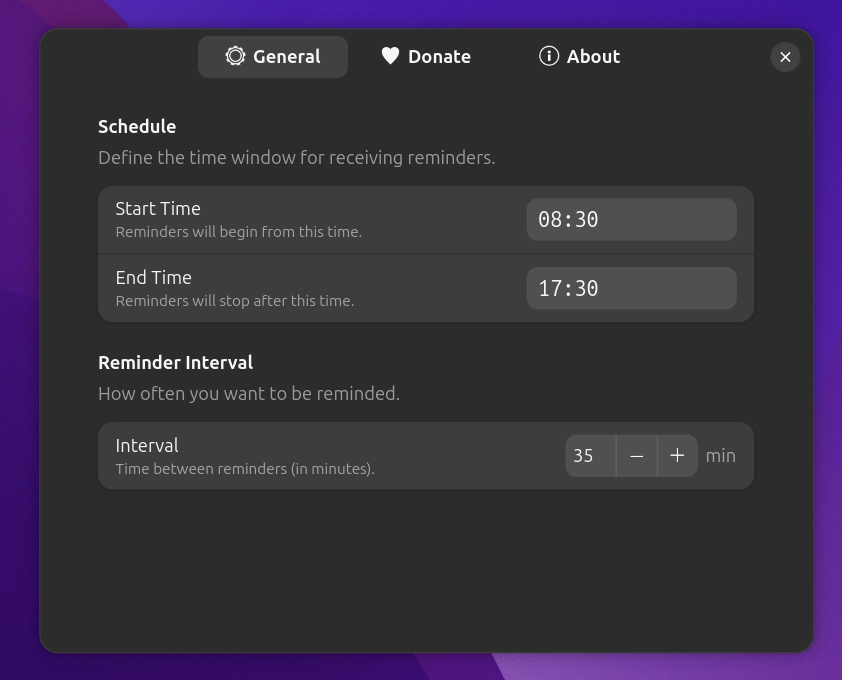
Water Reminder preferences window built with Libadwaita

A clean Libadwaita preferences window lets you set your active hours and how often you want to be reminded.

Everything you need, nothing you don't

Lightweight, native, and built to stay out of your way.

🔔

Smart Notifications

Reminders are sent only within your configured active hours, so they never interrupt you outside work time.

🔊

Sound Alert

Each reminder plays a system sound so you notice it even when your eyes are glued to the screen.

⏱️

Custom Interval

Choose how often you want to be reminded — anywhere from every 5 minutes to every 4 hours.

📋

Notification Area

Reminders are retained in the notification tray until you dismiss them, so you never miss one.

One-Click Reminder

Need water right now? Click the icon and hit "Remind me now" — no need to wait for the next interval.

💾

Persistent Settings

All preferences are saved via GSettings and survive reboots and GNOME Shell restarts.

Install in seconds

No root access required. Works on GNOME Shell 45 through 49.

1

Clone the repository

Download the source code from GitHub.

git clone https://github.com/gilson-fonsaca/water_reminder.git
cd water_reminder
2

Run the install script

The script copies the files, compiles the schema, and registers the extension.

bash install.sh
3

Restart GNOME Shell

Log out and back in (Wayland) or press Alt+F2 → r → Enter (X11) to activate the extension.

Requirements: GNOME Shell 45–49 · GJS · Libadwaita · canberra-gtk-play